

Create your own Safety Data Sheets for candles, wax melts, reed diffusers and home fragrance products, using your actual formulation and preferred language.
If you manufacture scented products, you already know that working with fragrance oils involves more than choosing the right scent. Every fragrance comes with its own chemical composition, hazard classifications and regulatory documentation. Once that fragrance is incorporated into a candle, diffuser or room spray, the resulting product has a different composition and potentially a different hazard classification.
The Safety Data Sheet (SDS) supplied with your fragrance oil describes the fragrance as supplied. It does not automatically describe the finished product you manufacture. We wanted to make that next step considerably easier. So we built SDS Workspace by Perfumedom, a free dedicated application that allows our customers to generate finished-product Safety Data Sheets using approved Perfumedom fragrance data, their chosen base and the actual fragrance concentration in their formulation. The complicated part happens behind the scenes. Your part is surprisingly straightforward.
Your formulation. Your percentage. Your SDS.
Many fragrance suppliers provide ready-made Safety Data Sheets for candles at standard concentrations, commonly 7%, 8% or 10%. These documents can be useful, but real manufacturing rarely follows one universal recipe. Perhaps your candle contains 6.5% fragrance oil. Another uses 9.2%. Your reed diffuser might contain 18% fragrance in a liquid carrier. With SDS Workspace, you can enter the concentration you actually use, anywhere from 0.1% to 50.0%, in increments of 0.1%.
The application calculates the finished mixture using the selected fragrance, the chosen carrier or base and your specified concentration. That distinction matters. A change in fragrance concentration can affect the classification of the finished product, including whether particular hazard statements, pictograms or other safety information are required. Rather than relying on a generic document prepared for a different formula, you can generate an SDS based on your own supported formulation.
How does SDS Workspace work?
1. Choose your fragrance oil
Search the approved Perfumedom catalogue by fragrance name or product code. The relevant regulatory source data is already connected to the material. There is no need to manually enter chemical components, CAS numbers or individual ingredient hazard classifications.
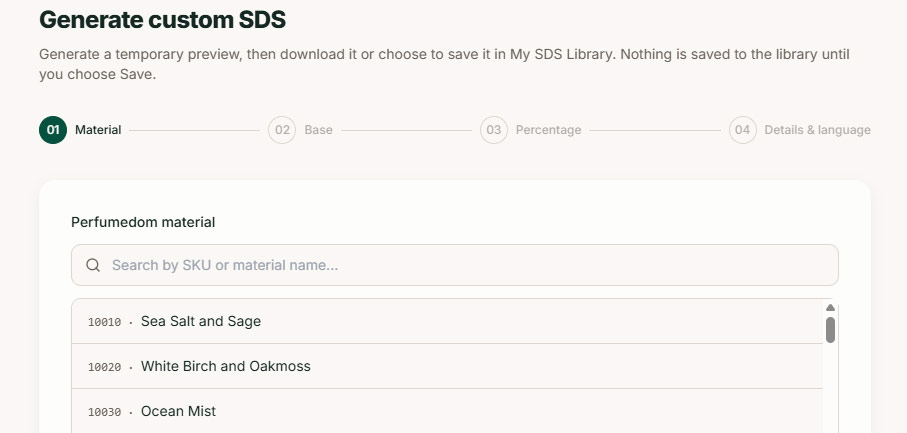
2. Select your carrier or base
Choose from the supported candle waxes and liquid carriers available in the application. The Workspace supports common candle-making bases and selected liquid carriers, including DPG, IPM and Augeo Clean Multi, for appropriate home-fragrance applications.
3. Enter your fragrance percentage
Specify the concentration used in your finished product. The Workspace uses that percentage to calculate the finished-mixture classification, taking the selected base and its regulatory profile into account.
4. Add your product details and generate
Enter your finished-product name, company details and preferred document language. You can also include your product code and an existing UFI, where applicable. Generate a preview, review the result and download your SDS as a PDF. You can also save the document to your personal SDS library.
That’s the entire customer-facing workflow, but if you want to learn more you can visit Explore how SDS Workspace works.
What goes into the Safety Data Sheet?
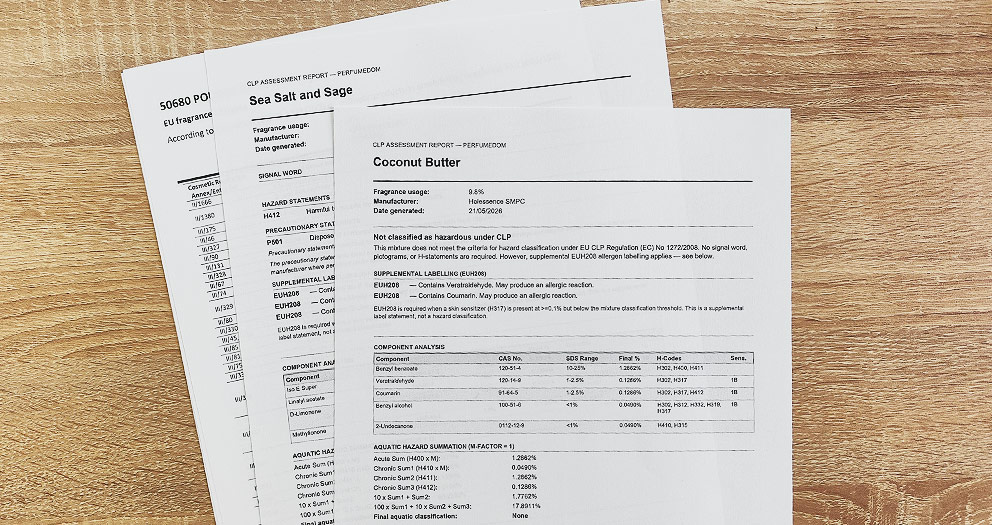
Quite a lot, actually. SDS Workspace produces a structured, 16-section Safety Data Sheet using the EU REACH and CLP frameworks applicable to its supported formulations. The application works with approved regulatory data associated with Perfumedom materials and controlled profiles for the available carriers and bases. Behind the interface, the calculation examines the relevant hazardous components and their concentrations in the finished mixture. It applies the classification rules used by the Workspace to determine the resulting hazard information.
The generated document includes the relevant classification, hazard and precautionary statements, pictograms where applicable, hazardous component information and the other sections of the SDS. It also identifies your company and finished product rather than simply reproducing the original fragrance supplier’s document.
We spent considerable effort developing this calculation system because the underlying chemistry cannot be reduced to simply multiplying every ingredient percentage and copying hazard statements from the fragrance SDS. Different hazard classes have different classification rules. Some require concentration thresholds, others use mixture calculations or component-specific information. SDS Workspace handles these calculations within its supported scope, using the regulatory source data available for each approved material.
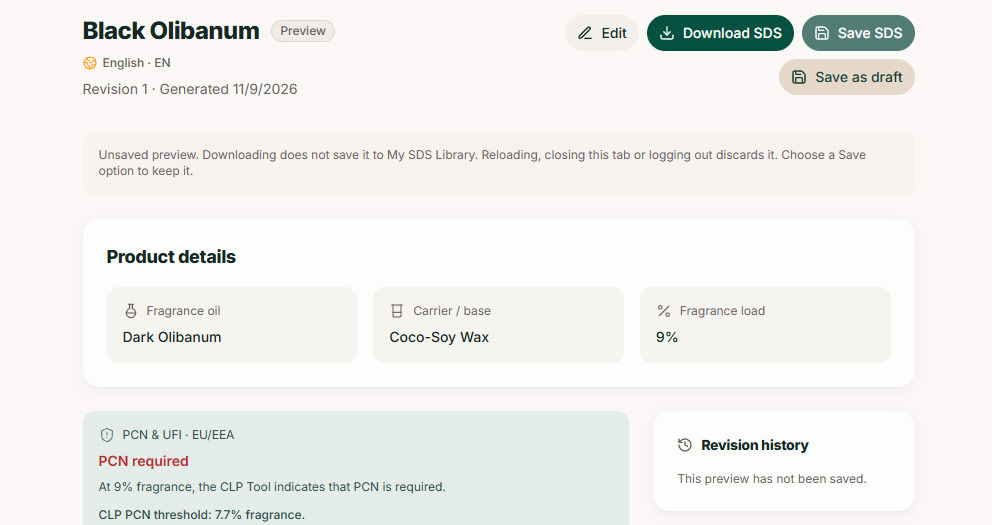
A full finished-product SDS, built around your actual recipe.
Available in 21 languages
Selling home-fragrance products across Europe introduces another practical challenge: documentation requirements differ by market, including the language in which safety information must be supplied. SDS Workspace can generate Safety Data Sheets in 21 languages, including English, German, French, Dutch, Italian, Spanish, Greek, Polish, Swedish, Danish, Finnish, Czech, Slovak and several others.
You select the output language during document creation. The application interface remains in English, while the generated SDS uses the chosen language. For small manufacturers selling into multiple European markets, having multilingual SDS generation within the same Workspace can remove a substantial amount of repetitive document preparation.
Your own SDS library
Product documentation rarely remains untouched after the first production run. You might change a fragrance concentration, introduce a new wax base or prepare a different version of an existing product. SDS Workspace includes a personal document library where you can keep your saved SDS records. You can return to an existing document, review its details and download the generated PDF again.
You can also use an existing record as the starting point for a revised formulation. This keeps your finished-product documentation organised alongside the formulations used to create it, without requiring you to start from scratch every time.
Beyond SDS generation: EU Compliance Updates
We also wanted to address another problem familiar to European manufacturers: keeping track of regulatory changes. EU chemical legislation does not stand still. Amendments to CLP, changes affecting substance classifications, poison-centre notification requirements and revisions to safety documentation rules can all have practical consequences for businesses manufacturing and selling scented products.
Following these developments usually means consulting several official sources, reading technical publications and determining which changes actually affect your business. That is why we introduced EU Compliance Updates, a dedicated regulatory information section within SDS Workspace.
Our team regularly reviews developments from sources such as EUR-Lex, ECHA and other relevant regulatory authorities. We select and explain developments that matter to fragrance materials, finished mixtures and home-fragrance manufacturers, with references to the underlying official publications. The updates are presented in a searchable timeline, organised by regulatory topic.
Our intention is to make these developments easier to follow, particularly for independent manufacturers who do not have a dedicated regulatory affairs department. We do not publish updates simply to keep the timeline busy. When there is nothing materially relevant to report, there is no reason to manufacture news. And because the Compliance Updates section is publicly accessible, you can consult it without entering the SDS creation workflow.
Built specifically for Perfumedom customers
SDS Workspace was developed around our own fragrance catalogue and the regulatory information associated with it. That gives us a controlled starting point for finished-product calculations. It also means that we can design the workflow around the products our customers actually manufacture.
The application currently focuses on supported Perfumedom materials used in candles, wax melts, reed diffusers and other home-fragrance products. It is not a general-purpose chemical formulation platform. Third-party fragrance oils, arbitrary fragrance blends and cosmetic formulations are outside its supported scope.
The Workspace can include an existing UFI in a generated SDS, but it does not issue UFI codes or submit Poison Centre Notifications. These remain separate regulatory processes. As with any technical documentation, the manufacturer remains responsible for the accuracy of the formulation and product details supplied, and for meeting the requirements applicable to the finished product and its intended market.
We believe that being clear about what a tool does, and what it does not do, is part of making it useful.
Why we built it
Perfumedom has always placed considerable importance on the technical documentation accompanying our fragrance oils. But providing an SDS, an IFRA certificate and an allergen declaration for a raw material is only part of the picture. Our customers use those materials to manufacture their own products. The regulatory work continues after the fragrance leaves our warehouse. We saw an opportunity to help with that next stage.
SDS Workspace is the result of bringing our fragrance documentation and finished-mixture calculation workflow into a single application, designed around the practical needs of candle makers and home-fragrance businesses. It is one of the more technically demanding projects we have developed at Perfumedom, and one we are particularly pleased to make available to our customers.
There is plenty of complexity behind the interface. Fortunately, you don’t have to deal with most of it.
Ready to create your finished-product SDS?
Visit SDS Workspace by Perfumedom to create an account, explore the supported formulations and start preparing your documents. You can also follow the latest relevant European regulatory developments through our EU Compliance Updates page.


Write a comment
Your email address will not be published. All fields are required